Recipe & Menu Management, Nutrition Analysis and Digital Menu Software
What is Nutri-Scheme?
Nutri-Scheme is a cloud-based recipe and menu management platform built for restaurants and hospitality businesses. The system automatically converts your recipes into structured nutrition analysis, nutrition labels, allergen information and food cost data, enabling you to generate and publish digital menus in under 15 minutes. By centralising recipe data, nutrition analysis and menu control within one platform, Nutri-Scheme helps restaurants strengthen food safety, improve transparency and protect profit margins.
Trusted by Restaurants
Restaurant partners
The Hidden Operational Risks in Modern Restaurants
Loss of Operational Control
Impact
Inconsistency, outdated information and a gradual loss of control over the business.
- Recipes exist in notebooks, spreadsheets or in someone’s head
- No single source of truth for dishes
- Changes are difficult to update when information is not centralised
Limited Transparency & Food Safety Risk
Impact
Increased food safety risk, reduced customer confidence and difficulty demonstrating due diligence when questions arise.
- Missing or incomplete Nutrition Fact Labels
- Unclear allergen documentation
- Limited traceability of ingredients and additives
Lack of Clarity Around True Food Cost
Impact
Margins erode quietly, and pricing decisions lack financial clarity.
- The true production cost per dish is unknown
- Ingredient price changes are not reflected
- Portion drift reduces profitability
From Informal Operations to Structured Control
Restaurants do not need complex enterprise systems. They need structure without unnecessary complexity.
Nutri-Scheme replaces informal processes with a single centralised platform that connects recipe management, nutrition analysis, food cost control and digital menu publishing.
Instead of relying on spreadsheets, disconnected files and undocumented know-how, you operate from one structured system designed for everyday use.
Structured recipes create structured data. Structured data creates consistent menus. Consistent menus create measurable operational control.
Operational Control Engine
One platform. Three control layers. Instant business visibility.
- Recipe standardisation with version control
- Nutrition and allergen intelligence in real time
- Synchronous digital menu publishing across channels
How It Works
1. Bring Structure to Your Recipes
Problem: Recipes are undocumented or scattered.
Impact: Inconsistency and loss of knowledge.
Functional Capabilities:
- Centralised recipe database
- Ingredient-level breakdown
- Portion standardisation
- Version tracking
- Secure cloud access
2. Improve Nutrition Transparency & Food Safety
Problem: Nutrition and allergen information is inconsistent or unavailable.
Impact: Reduced customer confidence and increased operational risk.
Functional Capabilities:
- Automated nutrition analysis
- Calorie calculation per portion
- Generation of structured Nutrition Fact Labels
- Customisable macronutrient display for menus
- Allergen and additive identification
- Full ingredient traceability
3. Gain Visibility Over Cost and Profitability
Problem: The true production cost per dish is unknown.
Impact: Margins erode without being noticed.
Functional Capabilities:
- Automatic ingredient cost calculation
- Accurate food cost per portion
- Margin visibility per dish
- Simple recipe adjustments
4. Publish and Update Menus in Minutes
Problem: Updating menus is slow and inconsistent.
Impact: Customers see outdated or conflicting information.
Functional Capabilities:
- Instant digital menu generation
- QR-based access
- Immediate updates
- Consistent information online and in-house
See How Your Digital Menu Looks
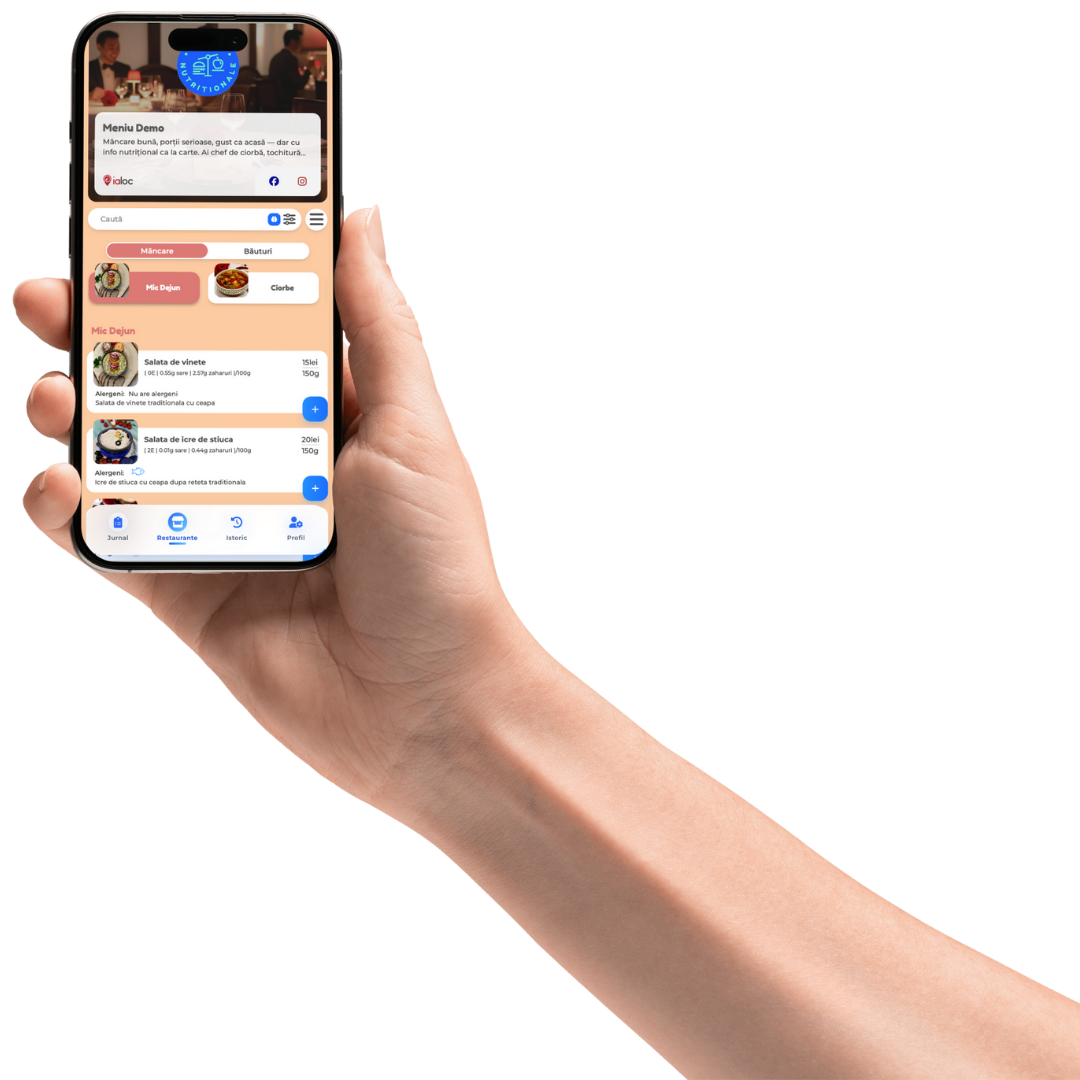
Your structured recipe data is transformed into a professional, mobile-friendly digital menu.
- Clear nutritional values
- Visible calorie information
- Allergen details
- Choice of macronutrients displayed
- Clean layout optimised for mobile devices
- Easy to update at any time
Printed menus can remain – while digital menus provide extended transparency.
Your digital menu becomes discoverable, structured and easily shareable online.
Display calories alongside any combination of macronutrients, or present full Nutrition Fact Labels – depending on your concept and customer expectations.
Built for Independent Restaurants
Many restaurant systems are built for large chains.
Nutri-Scheme is designed for operators who want professional structure without enterprise-level complexity.
- Operational clarity
- Structured recipe management
- Transparent nutrition information
- Clear food cost visibility
- Digital presence without unnecessary complication
No enterprise implementation.
No complex integrations required.
Just structured control within one accessible platform.
Try Nutri-Scheme Free for 5 Days
Simple & Transparent Pricing
Flexible plans designed for independent restaurants.
- No enterprise contracts
- Scalable as your business grows
basic
59.99
EUR/YEAR
- 10 recipes (credits) included**
- Nutritional facts calculator
- 100.000 ingredients database
- Choose and show allergens for your recipes
- Choose and show additives on your recipes
- Mark frozen ingredients
- PDF detailed Export
- PDF and Word brief export
advanced
199.99
EUR/YEAR
- 100 recipes (credits) included**
- AI-Powered Recipe Import from PDF and Photos
- Unlimited products without nutritional facts in menu
- Advanced COGS & Profit Optimization
- Branded Digital Menu + QR Code
- Up to 3 Extra Branded QR Menus
- Nutritional facts calculator
- Compliant Nutritional labels
- Choose and show allergens for your recipes
- Choose and show additives on your recipes
- Mark frozen ingredients
- PDF detailed Export
- PDF and Word brief export
399.99
EUR/YEAR
- 300 recipes (credits) included**
- AI-Powered Recipe Import from PDF and Photos
- Unlimited products without nutritional facts in menu
- Advanced COGS & Profit Optimization
- Branded Digital Menu + QR Code
- Up to 3 Extra Branded QR Menus
- Nutritional facts calculator
- Compliant Nutritional labels
- Choose and show allergens for your recipes
- Choose and show additives on your recipes
- Mark frozen ingredients
- PDF detailed Export
- PDF and Word brief export
Demo
See how Nutri-Scheme automates recipe management, nutrition analysis and digital menu publishing in a live demonstration.
You will see:
- How to add a recipe
- How nutrition analysis is generated
- How food cost is calculated
- How the digital menu is published
FAQ
How can I import my recipe book into the application?
Nutri-Scheme offers four ways to add recipes, two of which allow you to import existing content rather than starting from scratch.
The recipe file import option allows you to upload your existing recipe book — including dish names, portion weights, and ingredient quantities. The platform maps your data onto the ingredient database and calculates nutritional values automatically with allergens and aditives.
The photo import option works by taking a photo of your current printed menu. The app extracts the dish name, portion weight, and category automatically, then generates the ingredient list using the standardized database. This is the fastest way to migrate an existing paper menu into the system.
For new dishes, there is also an AI-assisted entry mode where you enter the dish name and portion size, then press “Generate ingredients” — the app completes the recipe automatically as a starting point that you can then review and adjust.
The fourth option is standard manual entry for full control over every ingredient and quantity.
Can I import my menu if I don’t have a recipe book?
Yes. Nutri-Scheme is specifically designed to work for restaurants that do not have a formally documented recipe book — which is the reality for most independent restaurants.
There are three ways to get your menu into the platform without a recipe book.
The first is photo import. You take a photo of your current printed menu — the one on your tables right now — and the app extracts the dish names, portion weights, and categories automatically. The ingredient list for each dish is then generated using the platform’s standardized database. You review, adjust if needed, and you are done. This is the fastest route from zero to a fully functional digital menu with nutritional values.
The second is AI-assisted entry. You type in a dish name and its portion weight, press “Generate ingredients,” and the platform proposes a complete ingredient list with quantities. This works well for standard dishes — pasta, grills, salads, soups — where the composition is predictable. You adjust anything that does not match your specific recipe and move on.
The third is manual entry, which gives you full control over every ingredient and quantity. This takes longer but is the right choice for signature dishes, house recipes, or anything with a non-standard composition.
Most restaurants start with the photo import to get their full menu into the system quickly, then refine individual recipes using manual entry for the dishes that matter most — seasonal specials, high-margin items, or dishes that frequently generate allergen questions from customers.
You do not need a recipe book, a spreadsheet, or any prior documentation to get started. The platform is built for the way independent restaurants actually operate, not for how they are supposed to operate in theory.
Can I add products without calculating nutritional values?
Yes. Nutri-Scheme does not require you to have nutritional data for every ingredient or product you add to the platform.
If you are adding a standard ingredient — chicken breast, olive oil, pasta, onions — the nutritional values are already in the platform’s standardized database. You do not need to calculate or enter anything manually. You select the ingredient, add the quantity, and the nutritional values are pulled in automatically.
If you are adding a custom ingredient that is not in the database — a product from a local supplier, a house-made sauce, or a specialty item — you have two options. You can enter the nutritional values manually from the product label, or you can add the ingredient without nutritional data and fill that in later. The platform will flag ingredients with missing nutritional information so you know which gaps to fill over time, but it will not block you from building recipes or using the platform in the meantime.
This means you can start building your recipe library and digital menu immediately, even if your ingredient data is incomplete. Many restaurants begin by getting their menu structure, allergens, and food costs into the system first — and layer in full nutritional data progressively as they go through their ingredient list.
The only limitation is that dishes containing ingredients without nutritional data will show incomplete nutritional values in the menu until those gaps are filled. Allergen information and food cost calculations are not affected — those work independently of whether nutritional values are present.
Can I have more than one QR code?
Yes. Nutri-Scheme allows you to generate multiple QR codes, which is useful in several practical scenarios for restaurants and hospitality businesses.
A restaurant with more than one location can generate a separate QR code for each venue. Each QR code links to the digital menu for that specific location, which means menus, pricing, and available dishes can differ between locations while still being managed from the same central platform.
Within a single location, you can also use different QR codes for different contexts — for example, one for the main dining room menu, one for a terrace or outdoor area with a shorter seasonal menu, and one for a private dining or events menu. This lets you control exactly what each group of customers sees without managing separate platforms or printed menus for each area.
QR codes in Nutri-Scheme are fully customizable. You can adjust the size and color to match your brand identity, and export them as PNG or PDF files ready to print on table cards, physical menus, window stickers, or any other surface.
Each QR code updates automatically whenever you make a change to the corresponding menu — a new dish, an updated price, a seasonal ingredient swap. There is no need to generate or reprint a new QR code every time the menu changes. The code stays the same; the content behind it updates instantly.
If I can’t find an ingredient in NutriScheme database, can I add it myself?
Yes. If an ingredient is not in the Nutri-Scheme database, you can add it yourself in three ways.
The first is manual entry. You type in the ingredient name, add the nutritional values from the product label — calories, protein, carbohydrates, fats, and salt — and assign any allergens and food additives that apply. The ingredient is then available across all your recipes, just like any standard ingredient in the database.
The second is photo import. You take a photo of the product packaging or nutritional label, and the app extracts the data automatically. This is the fastest option when you have the physical product in front of you and want to avoid typing out numbers manually.
The third is adding the ingredient without nutritional data for now — useful when you want to build a recipe immediately but do not have the product label to hand. You can complete the nutritional information later. Allergen and food cost data can still be added in the meantime, so the ingredient is fully functional for those purposes even before nutritional values are filled in.
Custom ingredients work exactly like standard database ingredients once added. They can be used in any recipe, they feed into automatic nutritional calculations, and they carry allergen and additive information that flows through to the digital menu automatically.
There is no limit on the number of custom ingredients you can add. This makes the platform fully adaptable to restaurants that work with local suppliers, specialty products, house-made components, or regional ingredients that are unlikely to appear in a generic international database.
If I am not satisfied after payment, can I get a refund?
Yes. NutriScheme offers a 14-day money-back guarantee on all new subscriptions, with no complicated process or lengthy justification required.
If you subscribed and decide within the first 14 days that NutriScheme is not the right fit for your restaurant, you can request a full refund — provided you have added no more than 3 recipes to your account during that period.
Before you pay anything, NutriScheme also offers a free 5-day trial that requires no credit card details. During the trial you can explore the platform and add up to 3 recipes to see how it works with your actual menu. This means you have a genuine opportunity to test the platform before committing, and a 14-day safety net after you do commit.
To summarise how the risk-free period works:
Days 1–5 — free trial, no card required, up to 3 recipes. No charge unless you choose to subscribe.
Days 1–14 after payment — full refund available if you have added no more than 3 recipes to your account.
To request a refund, contact the NutriScheme team directly within the 14-day window.
How long does it take to set up NutriScheme for my restaurant?
Most restaurants are fully set up on NutriScheme in under 30 minutes.
If you are starting from scratch — no recipe book, no spreadsheet — the fastest route is to take a photo of your current printed menu. The app extracts your dish names, portion weights, and categories automatically, then generates ingredient lists from the standardized database. You review, adjust where needed, and your digital menu with nutritional values and allergen information is live.
If you have an existing recipe book or spreadsheet, you can import it directly. The platform maps your ingredients to the database and calculates nutritional values automatically.
For restaurants that want to add recipes manually, the AI-assisted entry option lets you type a dish name and portion size, press “Generate ingredients,” and the platform proposes a complete ingredient list in seconds. Most standard dishes — pastas, grills, salads, soups — are done in under two minutes each.
There is no installation required, no IT setup, and no training sessions. NutriScheme works in any browser and on any device. You create your account, and you can start building your menu immediately.
The free 5-day trial — with no credit card required — is specifically designed to let you test this for yourself with your actual menu before committing to a subscription.
Can I export my recipes and nutritional data to Excel or PDF?
Yes. NutriScheme offers multiple export formats designed to cover different use cases — from regulatory compliance and internal documentation to food delivery platform integrations.
For PDF export, there are two options. The full export includes complete recipe information — ingredients, quantities, allergens, additives, and nutritional values — and is useful for compliance documentation, staff training materials, or records to present during food safety inspections. The concise export contains the essential information in a cleaner format, suitable for sharing with suppliers, nutritionists, or food consultants.
For Excel export, NutriScheme generates a structured spreadsheet containing all recipe and nutritional data. This format is specifically designed for integration with food delivery platforms and third-party systems that require data in a tabular format.
Nutritional labels can also be exported separately in four visual formats — including standard tabular format and front-of-package formats — compliant with EU and UK labeling standards, ready to print directly.
All exports update automatically based on your current recipe data. If you change an ingredient or adjust a portion size, the next export reflects those changes instantly — there is no manual updating required.
Can I use NutriScheme data on food delivery platforms like Uber Eats or Deliveroo?
Yes. NutriScheme exports recipe and nutritional data in Excel format, which is compatible with the data import requirements of major food delivery platforms including Uber Eats and Deliveroo.
This means you do not need to manually re-enter nutritional information, allergen data, or ingredient lists separately for each delivery platform. You build and maintain your recipes once in NutriScheme, export the data, and upload it to your delivery platform accounts.
This is particularly relevant in the UK, where Uber Eats and Deliveroo increasingly require or encourage restaurants to display allergen and nutritional information on their platform listings — in line with Natasha’s Law requirements and growing consumer demand for food transparency online.
Keeping your delivery platform data in sync with your in-restaurant menu is also an operational benefit. When a recipe changes — a new ingredient, a supplier switch, a seasonal variation — you update it once in NutriScheme and re-export. Both your QR code digital menu and your delivery platform listing reflect the same accurate information.
If you are currently managing your delivery platform menu separately from your in-restaurant menu, NutriScheme gives you a single source of truth for both.
What types of food businesses is NutriScheme suitable for?
NutriScheme is built for any food service business that prepares dishes from ingredients and wants to manage recipes, nutritional values, allergens, food costs, and digital menus in one place — without enterprise-level complexity or cost.
Restaurants of all types — from casual dining and family restaurants to fine dining and chef-led independents — use NutriScheme to manage their full menu, calculate nutritional values per dish, display allergen information, and generate a digital menu accessible via QR code.
Cafés and coffee shops use it to manage food menus alongside drink offerings, including allergen information for milk alternatives, baked goods, and snacks — increasingly important as customers with dietary requirements expect this information to be available before they order.
Pizzerias and fast casual restaurants use it to handle high-volume menus with ingredient variations — different bases, toppings, and sizes — where nutritional values and allergens need to be accurate across multiple combinations.
Bistros and brasseries use it to manage seasonal menus that change frequently, keeping nutritional and allergen data current without manual recalculation every time a dish is updated.
Patisseries and bakeries use it to label baked goods with full ingredient lists and allergen information — particularly relevant under Natasha’s Law in the UK for pre-packed and pre-packed for direct sale items — and to generate print-ready nutritional labels for retail products.
Confectioneries and dessert businesses use it to manage recipes for complex multi-component products, track allergens across all ingredients, and generate labels for packaged items sold in-store or online.
Catering companies use it to scale recipes across large-format events, maintain consistent nutritional information across different menus for different clients, and produce documentation for food safety compliance at events.
Canteens and staff restaurants use it to manage daily or weekly rotating menus, provide nutritional information to employees with dietary requirements, and maintain allergen records for institutional food safety audits.
Dark kitchens and delivery-only restaurants use it to keep their delivery platform listings — on Uber Eats, Deliveroo, and others — accurate and up to date with allergen and nutritional information, aligned with growing platform requirements and customer expectations.
What all these business types have in common is the need for accurate, consistent, and easily accessible food information — for their customers, their staff, and their regulators — without the cost and complexity of software built for large chains.
What is Nutri-Scheme and who is it for?
Nutri-Scheme is a recipe and menu management platform built for independent restaurants and HoReCa businesses. It automatically calculates nutritional values for every dish, manages allergens and food additives, and generates digital menus accessible via QR code — all without requiring enterprise-level investment.
Nutri-Scheme is designed for restaurant owners and managers running 1 to 3 locations who want full control over their recipes, food costs, and menu information, while also being transparent with their customers and visible online.
Unlike complex hospitality software built for large chains, Nutri-Scheme is simple to set up, requires no IT team or long training, and delivers clear value from day one.
How does Nutri-Scheme calculate nutritional values for a dish?
Nutri-Scheme calculates the nutritional values of each dish automatically, based on the ingredients and quantities defined in the recipe. For every ingredient added to a recipe, the platform uses a standardized nutritional database to retrieve values for calories (kcal and kJ), protein, carbohydrates (including sugars), fats (including saturated fats), and salt.
When a recipe is modified — for example, if an ingredient is replaced or a portion size changes — all nutritional values are recalculated instantly without any manual work.
Nutritional values can be displayed in three ways: per 100g or 100ml, per net portion, or per gross portion. This makes the platform compliant with both EU labeling standards for food service businesses and food producers..
The platform also supports adding custom ingredients manually or by importing a photo of a product label — the app extracts the data automatically.
How does Nutri-Scheme digital menu with QR code work?
Nutri-Scheme generates a fully branded digital menu that customers can access by scanning a QR code with their smartphone — no app download required.
The digital menu displays each dish with its full nutritional information (calories, macronutrients, allergens, and additives), along with photos, descriptions, labels such as vegan or vegetarian, and pricing. The menu can be configured in up to 6 languages, making it suitable for restaurants serving international guests.
The QR code itself is fully customizable — you can adjust its size, color, and export it as a PNG or PDF to print on table cards, physical menus, or window stickers.
From the management side, any change made to a recipe — a new ingredient, an updated portion size, a price change — is reflected in the digital menu immediately, without needing to reprint anything. The printed menu stays clean and simple, while the digital version carries all the detailed information.
Does Nutri-Scheme support multiple languages for the digital menu?
Yes. Nutri-Scheme supports up to 6 languages (English, Spanish, Italian, German, French and Hungarian) for the digital menu, making it suitable for restaurants and hospitality venues that serve international guests or operate in multilingual markets.
Restaurant owners can configure which languages are active on their menu and manage content in each language independently. Dish names, descriptions, and labels can be translated and displayed based on the customer’s preference or device language settings.
This is particularly useful for restaurants in tourist areas, hotels, airport food outlets, and urban restaurants in cities with high international foot traffic. Offering a menu in multiple languages improves the customer experience for foreign visitors who may have dietary restrictions or allergies and need to understand exactly what they are ordering.
The multilingual functionality is built into the digital QR menu and does not require a separate subscription or module.
How much does Nutri-Scheme cost and what does the subscription include?
Nutri-Scheme is priced to be accessible for independent restaurants and small HoReCa businesses, with a target annual cost of approximately €199.99 per year — a fraction of the cost of enterprise hospitality software.
The subscription includes the full platform: automatic nutritional value calculation, recipe and ingredient management, allergen and additive tracking, recipes technical sheets, digital menu generation with customizable QR code, multilingual menu support, nutritional label export in multiple formats, and the customer nutritional journal feature.
There are no hidden modules, no mandatory onboarding sessions, and no long-term lock-in contracts. The platform is designed to work immediately after setup, without requiring IT support or staff training programs.
Nutri-Scheme is positioned as an alternative to complex and expensive HoReCa management systems that are built for large chains — delivering the same level of professionalism and transparency at a price point that makes sense for owner-operated restaurants and small groups.
For the most current pricing and plan details, visit the Nutri-Scheme website directly.
How can I calculate the real production cost of a dish?
Nutri-Scheme calculates the ingredient cost of every recipe automatically, based on the price you assign to each ingredient in the platform.
When you build a recipe — adding ingredients and their quantities — the platform calculates the total ingredient cost per recipe and per portion. If an ingredient price changes, updating it in the system recalculates the cost of every recipe that uses that ingredient instantly.
This gives restaurant owners a clear, accurate picture of their food cost per dish, which is the foundation for setting profitable menu prices. Without this data, food cost is typically estimated or guessed, which leads to dishes being underpriced, margins being eroded, and pricing decisions being made on instinct rather than numbers.
Nutri-Scheme does not replace a full accounting or ERP system, but it closes a critical gap for independent restaurants: knowing exactly what each dish costs to produce, in real time, based on current ingredient prices.
For multi-location businesses, the same cost visibility applies across all locations using the same recipes.
Can I print nutritional labels directly from NutriScheme?
Yes. NutriScheme generates print-ready nutritional labels for any recipe in your account, in four visual formats.
The available formats include the standard nutritional table — the format most commonly seen on packaged food products — and front-of-package formats that display key nutritional information in a compact, consumer-friendly layout. All formats are compliant with EU and UK nutritional labeling standards.
Labels are exported as PDF files, formatted and ready to print directly without any additional design work. You can print them on standard label paper, include them on packaging for takeaway or retail items, or attach them to catering trays and event food displays.
Labels update automatically when a recipe changes. If you adjust an ingredient or portion size, the next time you export the label it reflects the current nutritional values — you do not need to manually recalculate or redesign anything.
This functionality is particularly useful for restaurants that also sell packaged items — house-made sauces, desserts, or meal kits — where printed nutritional labels are required by law for retail sale, as well as for catering businesses that need to label food prepared off-site for events.
Does NutriScheme comply with Natasha's Law in the UK?
Yes. NutriScheme is designed to help food businesses meet the allergen disclosure requirements introduced by Natasha’s Law, which came into force in the UK on 1 October 2021.
Natasha’s Law — formally the UK Food Information Amendment — requires that all food produced and packed on the same premises where it is sold must carry a full ingredient list with allergens clearly emphasised. For restaurants and food service businesses more broadly, it reinforced the existing requirement to provide accurate allergen information for every dish served, whether pre-packed or prepared fresh.
NutriScheme supports compliance in several practical ways. The platform automatically identifies all 14 major allergens in every recipe based on its ingredients, eliminating the manual tracking that leads to errors. Allergen information is displayed clearly in the digital menu, accessible via QR code, so customers can check it themselves before ordering — reducing reliance on staff knowledge, which is one of the most common sources of allergen miscommunication in restaurants.
For pre-packed and pre-packed for direct sale (PPDS) items, NutriScheme generates print-ready labels with full ingredient lists and emphasised allergens, in formats compliant with UK labeling requirements.
The platform also maintains a centralised, always-current record of allergen information for every recipe — which is best practice for demonstrating due diligence during a food safety inspection by the Environmental Health Officer (EHO).
If you are unsure whether your specific food business type falls under Natasha’s Law, the Food Standards Agency (FSA) website provides detailed guidance for different business categories.
Is NutriScheme suitable for restaurants that change their menu seasonally?
Yes. NutriScheme is specifically built for the way independent restaurants actually operate — including menus that change by season, by week, or whenever a new dish replaces an old one.
When you update a recipe — swapping a summer ingredient for a winter alternative, adjusting a portion size, or replacing a supplier product — all nutritional values, allergen information, and food cost calculations update automatically across every place that recipe appears. Your digital menu reflects the change instantly, without needing to reprint anything or manually update multiple documents.
Adding a new seasonal dish is equally straightforward. You can create it manually, use AI-assisted entry to generate an ingredient list from the dish name and portion weight, or import it from a photo of your specials board. Once added, it appears in your digital menu immediately.
If you run seasonal specials alongside a permanent core menu, you can manage both within the same account — adding, hiding, or removing dishes as needed without affecting the rest of your menu.
For restaurants that work with seasonal local produce — where an ingredient might change supplier or variety between seasons — updating the ingredient in NutriScheme automatically recalculates the nutritional values for every recipe that uses it across your entire menu. You make one change, and everything stays accurate.